Your AI Producer for Live, Viral Podcasting

Liyam helps you stay on track, generate real-time follow-ups, add visuals without pausing, and turn viral moments into clips fast.


Say Hello To Liyam

When you record solo or with a small team, someone still ends up doing the crew work: producing, researching, tracking time, editing, and thinking ahead to distribution and marketing.

But that all comes at a cost. Episodes go off-topic, dead air shows up, great follow-up questions are missed, and standout moments are buried in the footage.

Liyam gives you crew power while you record so the episode is stronger before editing even starts.

Real-time audience engagement

Real-time Viral Questions

Generates follow-up questions in real time based on what's being said, plus optional cues from what's trending.

Instant media lookup

Find Media Fast

Call up relevant articles, images, and clips while you're recording, so you can grab context fast without losing momentum.

Live media overlays

Embedded Media Overlays

Create images and videos from the live conversation, and display them on additional screens. Media overlays auto-sync on screen as you talk.

On-screen podcast script

On-Screen Script

Keep your run-of-show and questions on screen while you record, organized by topic so you're never lost mid-episode.

Podcast clip creation

Viral Clip Creation

Automatically identify the moments most likely to get shared, then generate clips quickly, with captions and post-ready text.

How it works

1. Plan Your Podcast

Plan every detail.
Record without thinking.

Build a complete episode plan — questions, visuals, notes, and timing for every segment. When recording starts, everything is in front of you, in order, ready to run.

Prep call agent — Join your prep call and let Liyam's agent listen in. It drafts your outline, structures segments, and writes your questions automatically.
Drop your research — Upload files, paste links, share notes. Liyam turns your materials into a ready-to-record structure in seconds.

Or build your episode plan manually — your way.

See it build your next episode
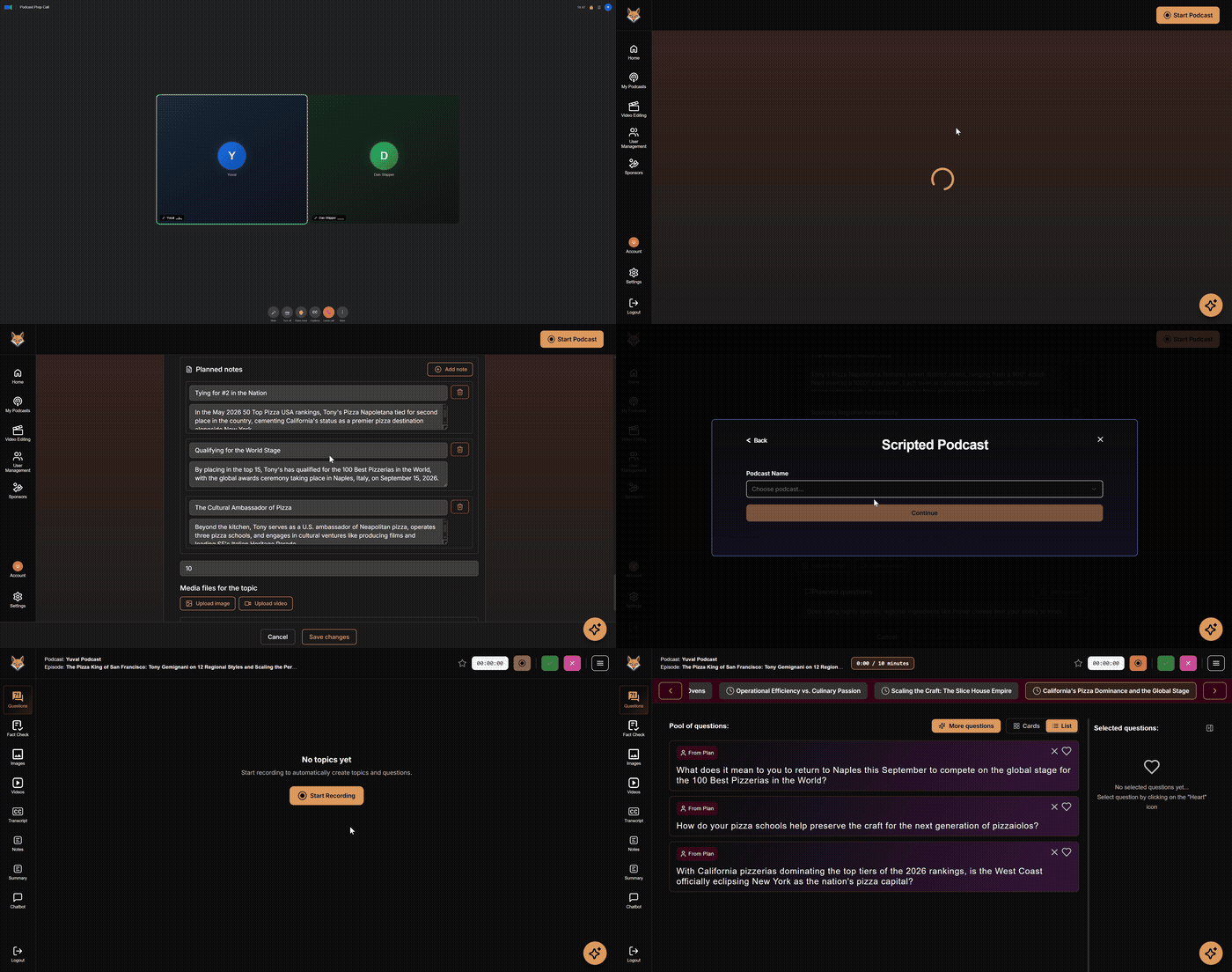
Plan your podcast
2. Record Your Podcast

A producer in your ear,
the whole time
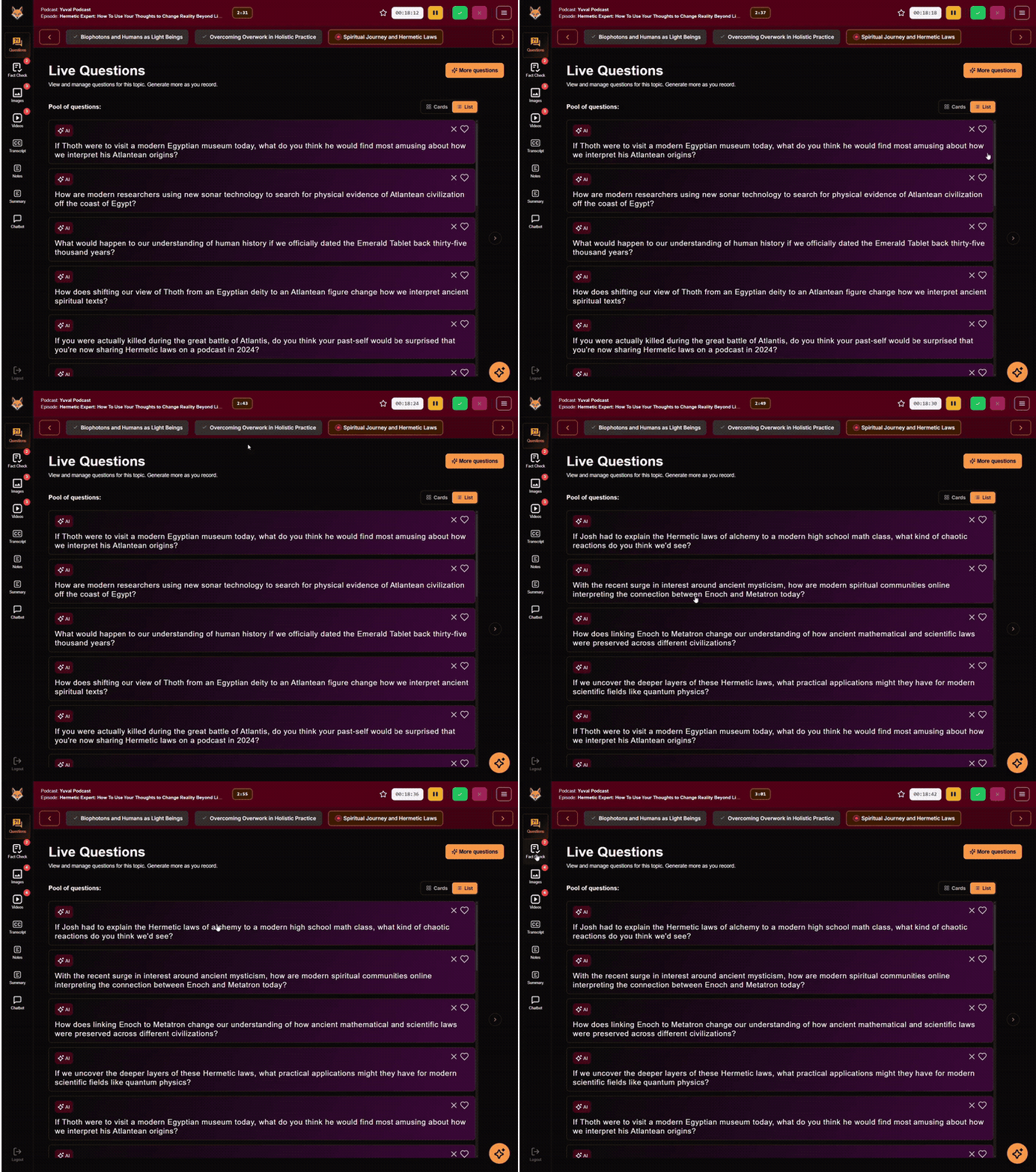
Live questions — Real-time follow-up questions based on what's being said, so you never leave thinking "I should've asked that."
Pacing prompts — Optional cues keep you on structure without scripting you.
Live fact check — Catch inaccuracies as they happen and bring sources on screen without breaking momentum.
Second screen — Push visuals to a separate display for your guest or audience without cluttering your view.
See it in a live recording
Live questions demo
3. Clip and Promote

From recording to ready-to-share

Auto clip detection — Liyam finds the most watchable moments so you're not scrubbing through hours of footage.
Captions and post copy — Subtitles, summaries, and social-ready text generated with each clip.
One-click export — Better clips, not more clips. Share what earns attention and brings people back to the full episode.
See how it works

See it in action

Meet your AI crew in 60 seconds

Monetization

Turn your podcast into a revenue channel

Liyam connects podcasters with sponsors through live, context-aware placements — so brands reach audiences at the right moment and creators monetize without breaking the flow of the show.

FAQs

What is Liyam?+
Liyam is your AI producer for live podcasting (both audio and video). It supports you during recording with real-time follow-up questions and on-screen media you can reference in the moment, then helps you move faster from a full episode to shareable clips.
Do I need to change my recording platform?+
No. Liyam runs in the browser alongside your current setup, so you can keep using the recording tools you already have.
Is Liyam a plugin?+
Not exactly. Liyam is a web-based app and includes a Chrome extension, so it fits into a modern, browser-based recording workflow.
What does "real-time questions" mean?+
While you're recording, Liyam listens to the conversation and suggests follow-up questions based on what's actually being said - not pre-written prompts.
What are "embedded media overlays"?+
Embedded media overlays are on-screen visuals you can show while you record, like an article, image, or clip - displayed on additional screens or as picture-in-picture.
Does Liyam edit my whole episode?+
No. It's not trying to replace a full editor timeline. It's designed to make the recording itself stronger and clip production faster.
Will Liyam interrupt me while I'm hosting?+
No. It suggests; you choose what to use.
Does Liyam do fact-checking?+
Liyam can help you pull up sources and add context quickly, which supports better on-air accuracy. We don't claim automated fact-checking.
Can I try it before committing?+
Yes. There's a free option so you can test the workflow before upgrading.
What about privacy and data?+
Liyam has a privacy policy and clear terms. If you have specific requirements (client work, studio productions, etc.), contact us and we'll walk you through the details.

Get in touch

Questions about Liyam, pricing, or a demo? Send us a message and we'll get back to you.